A: An untethered bypass means that once you have successfully bypassed the lock, your device will remain unlocked even after it is rebooted or turned off and on again. A tethered bypass would require you to connect it to a computer and run the tool again after every reboot.
Run your downloaded driver installer. This allows the bypass software to communicate with the iPhone while it is in DFU (Device Firmware Update) mode.
: The original Apple Tech 752 YouTube channel was terminated in 2021, so many video tutorials linked in older forum posts are no longer available.
Temporarily disable your antivirus software or Windows Defender Real-Time Protection before extraction.
| Feature | Description | | :--- | :--- | | | Removes the "Hello" setup screen, allowing access to the device's home screen. This is a tethered bypass, meaning if the device restarts, the lock screen will reappear, and you'll need to rerun the tool. | | iCloud Bypass (Untethered + Signal) | A more advanced method that survives reboots (untethered) and restores cellular and Wi-Fi functionality for calls and data. It typically requires a paid or premium version of a tool. | | Passcode Bypass (Untethered + Signal) | Allows access to a device that is disabled because the screen passcode has been entered incorrectly too many times. Similar to the iCloud bypass, some paid versions can save the device data and restore full functionality. | | Jailbreak Integration | Almost all bypass methods rely on a jailbreak to access the device's file system. Tools like Checkra1n are used to perform the initial jailbreak, after which the bypass tool can modify the necessary system files. | | Supported Devices | These tools are exclusively for older iOS devices with A7 to A11 chips (iPhone 5s to iPhone X). Newer devices like the iPhone 11, 12, and 13 are not supported by this method. |
The "apple tech 752 bypass tool 55" is a piece of software from a bygone era of iOS hacking. While it is famous and may have helped many people get older, locked devices working again, its age, high risk of malware, limited device support, and potential to permanently brick your phone make it a poor choice for most users today.
Stay safe online.
"Tool 55" was the specific revision. Rumor had it that version 55 was the last stable build before the tech giant’s lawyers shut the servers down, or before a Windows 11 update rendered the drivers obsolete. It wasn't just software; it was a ghost.
To the uninitiated, it looked like gibberish—a spammy keyword soup found on shady forums and clickbait YouTube thumbnails. But to Elias, and to the thousands of desperate souls navigating the grey market of mobile repair, it was a key. A skeleton key for the digital age.
Plug the jailbroken device into your PC using a reliable USB-A to Lightning cable. Avoid USB hubs.
The tools largely rely on the checkm8 exploit, meaning it works best on devices with A5-A11 chips (iPhone 4S to iPhone X).
→ Use Apple’s official site: iCloud Activation Lock removal request
This helper utility is essential for installing missing drivers and checking your device's connection status. Step 2: Preparing Your Windows Environment
A mature, cross-platform tool that supports both Windows and macOS, offering managed options for bypassing activation screens with various levels of functionality (including paid options that enable cellular capabilities).
Apple Tech 752 Bypass Tool 5.5 Download & Windows Install Guide
If you’re locked out of an Apple device you lawfully own, here are legitimate next steps you can take:
Note: To qualify for
Upgrade versions below you must
the Product Serial Number from the
Constructor version you own (v12- v15), and the name
it is registered to.
Constructor
16
Upgrade from v15
CM-100-16-UPG1
$199.00
Constructor
16
Upgrade from v14
CM-100-16-UPG2
$249.00
for Site License Upgrade Pricing. (Include
your current version Number)
Click photos below
for a Full Screen
Picture
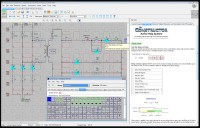
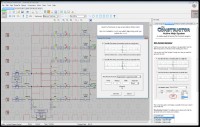
Picture of The Constructor
in the EDIT mode.
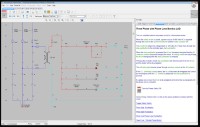
Picture of The Constructor in the
RUN
mode. Screen also shows an open
Workbook.
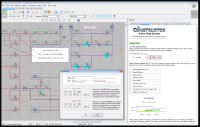
Picture of The Constructor with Open Time Delay Dialog
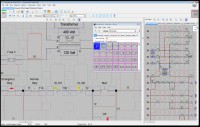
Picture of The Constructor
with PLC I/O and a load PLC I/O module
dialog box.
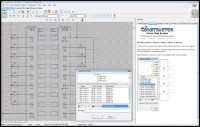
Picture of The Constructor
with wire generator screen.
Picture of The Constructor
with wire label screen open. It shows
wire numbers applied to a Brady label template.
The Constructor
(PDF)
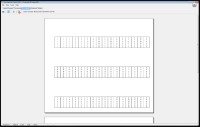
Export Preview Screen
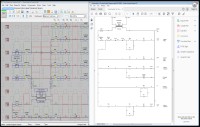
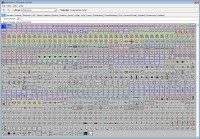
The Constructor Zoom Screen
Apple Tech 752 Bypass Tool 55 ~upd~ Download Windows Install | Certified 2027 |
Electrical
Ladder Diagram, Schematic and PLC Training / Simulation Software
for Windows 11, 10, 8, 7
The Constructor
program makes the creation, testing, trouble-shooting, teaching and
printing of electrical ladder diagrams, schematics and one line diagrams
fast and easy.
Software will be Downloadable. A
short time after Purchase, an Email will be sent with Download Link and
License Key
The Constructor
Software is unique in it's ability to test an electrical circuit.
Now the
complete circuit can be tested from the three phase power components to
the control circuit. See and Hear the circuit running. The
built-in symbol libraries of over 720 symbols makes the creation of your
diagrams fast and easy.
We also have
optional libraries containing
over 1800 Allen Bradley, Automation Direct, Cutler Hammer, GE
Fanuc, Idec, Mitsubishi, Modicon, Omron, Siemens, Telemecanique
and Toshiba PLC I/O diagrams. - more
Create, Test and
Print Ladder Diagrams
The Constructor program makes the
creation, testing, trouble-shooting, teaching and printing of electrical
ladder diagrams, diagram schematics and one line diagrams fast and easy.
The circuit will perform the same as a hard wired electrical circuit.
The design can be edited and re-tested saving valuable time when it
comes to hard wired circuits and trouble-shooting scenarios. This
program is unique in its ability to test an electrical circuit. You can
see the power flow in the
diagram and hear the sound effects
when a motor or siren is energized. Once designed, any circuit can then
be virtually energized and
operated on your computer monitor.
The circuit simulator is a great teaching
tool. Our customers tell us the Constructor is the quickest and easiest
electrical cad software they've ever used.
The built-in symbol libraries of over 800
symbols makes the creation of your diagrams fast and easy. The built-in
symbol editor allows you to create your own custom electrical symbols
for that special project. Optional PLC I/O libraries are
available for most PLCs (Over 1800 I/O modules) An optional additional
sound library allows you to add 126 more sound effects to your circuit
diagrams.
Easy to Learn and
Use
Our new Active help system, help
files, and a pdf manual makes learning to use this powerful software
much faster and easier. Your complete
circuit can be tested, from the three phase power
components to the control circuit.
Many of our customers have used
electrical cad software before and comment about how easy our software
is to use compared with other electrical cad software.
All the Features
You Need
Powerful zooming features for
faster editing and easier viewing of your electrical diagrams. Over 50
color schemes allow you to set your personal color preference. Automatic
legends and borders allow you to make
professional looking electrical diagrams quickly. You
can print your ladder diagrams out on your choice of any printer or
plotter that Windows supports.
The diagram may be saved to your
hard drive, flashdrive or a floppy disk for easy reference or
modification. You can also save images from within The Constructor
program as bitmap files.
The bitmap files can then be used
for printing or imported into other programs.
Portability
If you need to send a diagram to an
associate now you can export your diagram as a PDF
file. Exporting your diagram as a
DXF, DWG, JPG, GIF, TIF or PNG file
is also an option. Print wire labels using
pre-designed wire label templates for Brady and other label
manufacturers. Our auto wire feature allows you to quickly add wire
numbers to your diagrams with a host of options available.
Optional Additions Available
Optional PLC I/O libraries are
available for most PLCs (Over 1800 I/O modules). An optional additional
sound library allows you to add 126 more sound effects to your circuit
diagrams.
CONSTRUCTOR
16
with Ladder Logic Simulation
NEW Features
Improved PDF and DXF Export
Improved installation for Windows 11.
More Symbols - now over 900 symbols
Enhanced/Faster method of doing assignments,
groups and associations in your diagram.
Enhanced/Faster method of drawing wires in
your diagram.
The probe now automatically changes from
continuity to power mode when either probe becomes in contact with
power
Automatic creation of PDF export symbols.
Virtually Energize and Operate Your Diagram
Works with Windows 7, 8 10 or 11.
Export features: PDF and DXF.
Change Wire Colors and Styles
Built-in Symbol Editor
Troubleshooting Mode for Training
Voltage/Continuity Test Probe
Built-in Symbol Libraries of over 900 JIC,
NEMA and IEC Symbols
Symbol Library Search
Sound Effects (Hear the Difference!)
Interactive on-screen help
Easier and faster to use than most CAD
Software
Generic PLC I/O modules and Terminal Strip
libraries
Automatic Wire Numbering and Re-numbering
Auto High-Lighting of Contacts Assigned to
Coils
Simulation Scripting - Run your circuit hands
free
Apple Tech 752 Bypass Tool 55 ~upd~ Download Windows Install | Certified 2027 |
A: An untethered bypass means that once you have successfully bypassed the lock, your device will remain unlocked even after it is rebooted or turned off and on again. A tethered bypass would require you to connect it to a computer and run the tool again after every reboot.
Run your downloaded driver installer. This allows the bypass software to communicate with the iPhone while it is in DFU (Device Firmware Update) mode.
: The original Apple Tech 752 YouTube channel was terminated in 2021, so many video tutorials linked in older forum posts are no longer available.
Temporarily disable your antivirus software or Windows Defender Real-Time Protection before extraction.
| Feature | Description | | :--- | :--- | | | Removes the "Hello" setup screen, allowing access to the device's home screen. This is a tethered bypass, meaning if the device restarts, the lock screen will reappear, and you'll need to rerun the tool. | | iCloud Bypass (Untethered + Signal) | A more advanced method that survives reboots (untethered) and restores cellular and Wi-Fi functionality for calls and data. It typically requires a paid or premium version of a tool. | | Passcode Bypass (Untethered + Signal) | Allows access to a device that is disabled because the screen passcode has been entered incorrectly too many times. Similar to the iCloud bypass, some paid versions can save the device data and restore full functionality. | | Jailbreak Integration | Almost all bypass methods rely on a jailbreak to access the device's file system. Tools like Checkra1n are used to perform the initial jailbreak, after which the bypass tool can modify the necessary system files. | | Supported Devices | These tools are exclusively for older iOS devices with A7 to A11 chips (iPhone 5s to iPhone X). Newer devices like the iPhone 11, 12, and 13 are not supported by this method. | apple tech 752 bypass tool 55 download windows install
The "apple tech 752 bypass tool 55" is a piece of software from a bygone era of iOS hacking. While it is famous and may have helped many people get older, locked devices working again, its age, high risk of malware, limited device support, and potential to permanently brick your phone make it a poor choice for most users today.
Stay safe online.
"Tool 55" was the specific revision. Rumor had it that version 55 was the last stable build before the tech giant’s lawyers shut the servers down, or before a Windows 11 update rendered the drivers obsolete. It wasn't just software; it was a ghost.
To the uninitiated, it looked like gibberish—a spammy keyword soup found on shady forums and clickbait YouTube thumbnails. But to Elias, and to the thousands of desperate souls navigating the grey market of mobile repair, it was a key. A skeleton key for the digital age. A: An untethered bypass means that once you
Plug the jailbroken device into your PC using a reliable USB-A to Lightning cable. Avoid USB hubs.
This helper utility is essential for installing missing drivers and checking your device's connection status. Step 2: Preparing Your Windows Environment
A mature, cross-platform tool that supports both Windows and macOS, offering managed options for bypassing activation screens with various levels of functionality (including paid options that enable cellular capabilities).
Apple Tech 752 Bypass Tool 5.5 Download & Windows Install Guide
If you’re locked out of an Apple device you lawfully own, here are legitimate next steps you can take:
System Requirements
Minimum System Requirements
To run the Constructor, your computer system should meet the minimum
system requirements:
Windows 7, 8, 10 or 11 (32 or 64 Bit)
900 MHz processor
512 MB of Memory
100 MB of hard disk space
800 x 600 Display
Pointing Device: Mouse
Recommended System
For improved performance, the following computer system or greater is
recommended:
Order online:Add the item(s) to your shopping cart and
submit your order online through an encrypted secure
server.Major Credit Cards and PayPal are
accepted.
Order offline:Print an
offline order form
and Mail or Fax your order to us.



 Order online:
 Add
Add  Order offline:
